[[{“value”:”
Hey AI Breakers 👋
Claude Code is powerful. It’s also expensive if you’re not paying attention. Most people burn through tokens without knowing where they go or how to stop the bleeding.
Today, you’ll build a Token Savings System with 7 techniques that cut your Claude Code costs by 50-60%, without sacrificing output quality.
-
✅ A clear picture of where your tokens actually go
-
✅ The right model for every type of task (stop overpaying)
-
✅ A lean CLAUDE.md that doesn’t waste context on every message
-
✅ Context management habits that prevent runaway sessions
-
✅ Plan mode mastery for complex work (cheaper AND better results)
-
✅ Thinking effort controls that save thousands of tokens per request
-
✅ A delegation play that isolates expensive operations
Let’s build it 👇

🧠 Why Claude Code Gets Expensive (and Where the Tokens Go)
Every message you send includes everything Claude is holding in memory. The bigger that context gets, the more each message costs.
Here’s where the money actually leaks:
-
📊 Many active developers spend $5-10/day on Claude Code via API
-
📊 In heavy sessions, over 90% of tokens are cache reads on stale context
-
📊 Extended thinking tokens bill as output tokens (the expensive kind)
-
📊 The wrong model on routine work can double your bill
The 7 techniques below target the biggest sinks:
-
🔴 Bloated context (stale history piling up)
-
🔴 Wrong model choices (using Opus for simple tasks)
-
🔴 Unnecessary thinking (deep reasoning on easy edits)
-
🔴 Sessions that run too long without cleanup
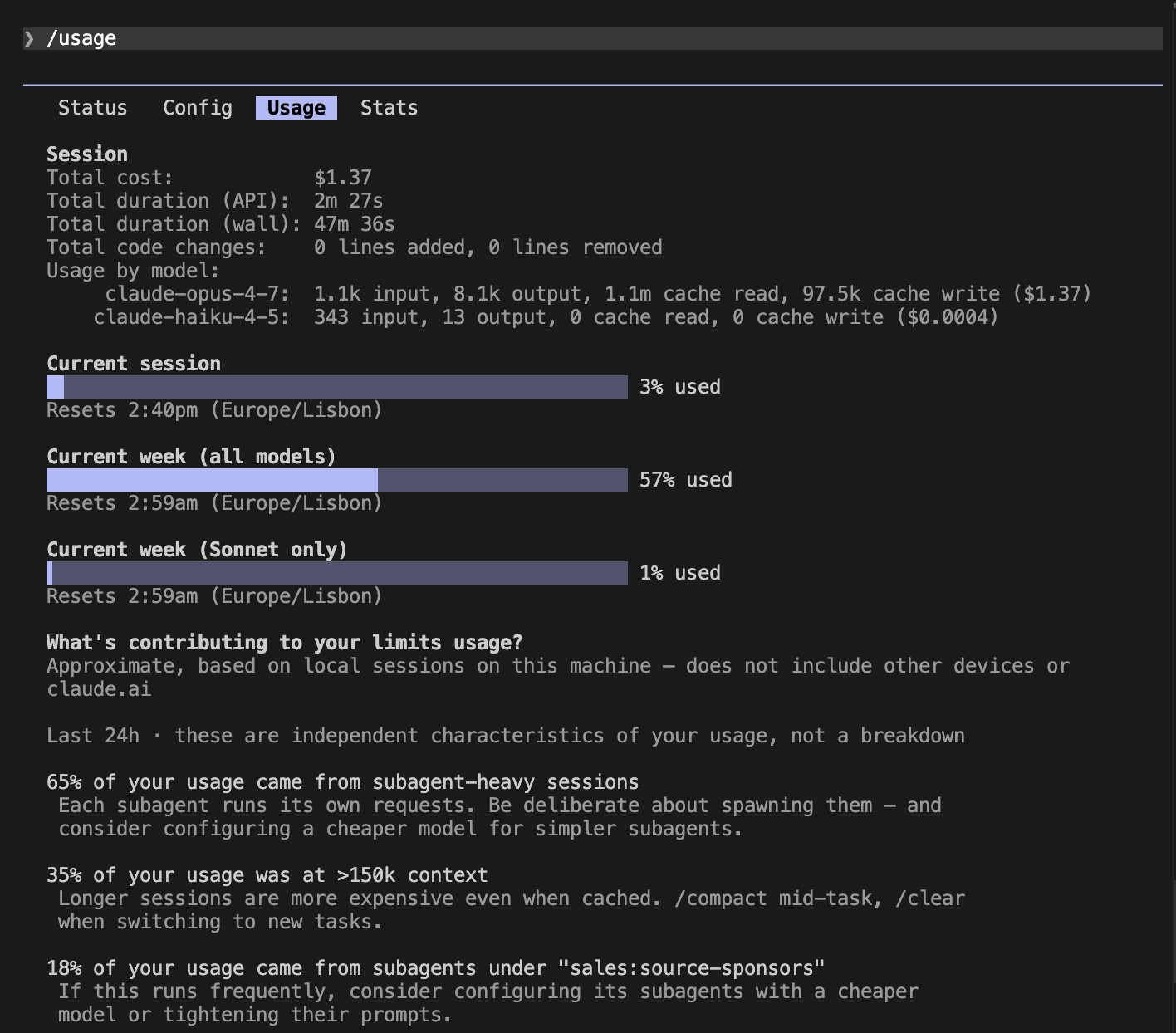
📊 Prompt #1 → The Cost Auditor (Know Where Your Tokens Go)
You can’t cut what you can’t see. Start by checking what you’re actually spending and how full your context is.
The goal:
-
See your current session’s token cost or plan usage
-
Understand your usage patterns over time
-
Spot a context window that’s filling up before it costs you
✅ Use this before and after every session to track your savings.
Prompt:
/usage
💡 Tip: Quick guide for picking the right plan:
-
Light or occasional use → API pay-as-you-go
-
Daily heavy use → Max 5x ($100/mo)
-
Power user, multi-hour sessions every day → Max 20x ($200/mo)
🔄 Prompt #2 → The Model Switcher (Stop Using Opus for Everything)
Opus is brilliant. It’s also 1.7x more expensive than Sonnet. Most of the time, Sonnet handles your task just fine.
The goal:
-
Use the cheapest model that gets the job done
-
Reserve expensive models for complex reasoning only
-
Set smart defaults so you don’t have to think about it
✅ Use this to instantly cut per-token costs by 30-40% on routine tasks.
Prompt:
/model
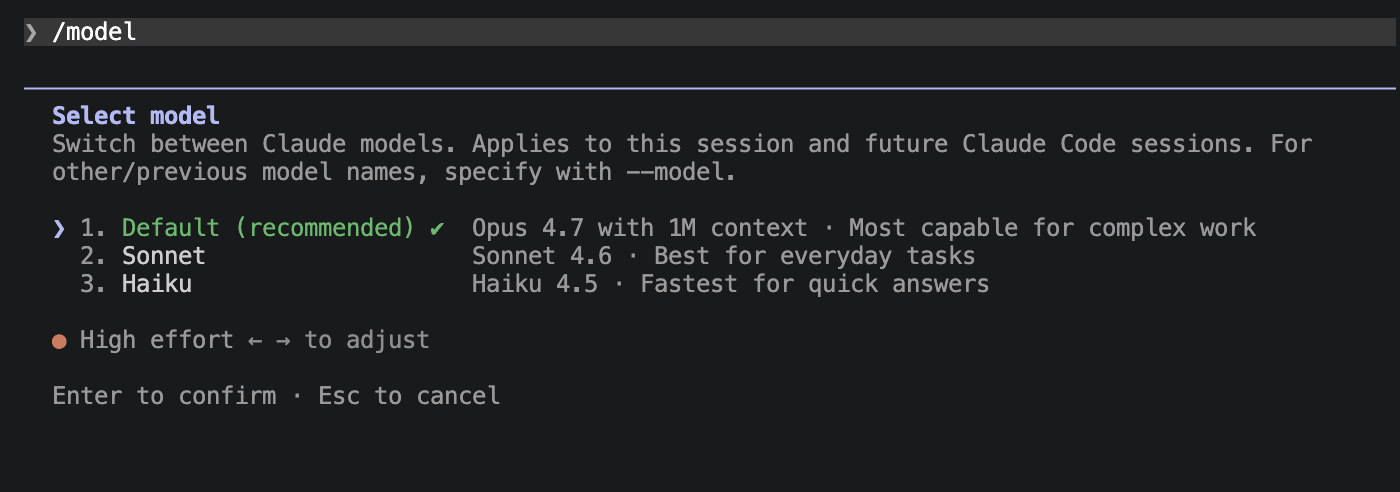
This opens the model selector. Here’s the cheat sheet:
-
🟢 Sonnet 4.6 ($3/$15 per M tokens): Your daily driver. Code generation, file edits, searches, and most tasks. Use this 80% of the time.
-
🟣 Opus 4.7 ($5/$25 per M tokens): Complex architecture decisions, multi-file refactors, subtle bug hunting. Use this for the hard 20%.
-
⚡ Haiku 4.5 ($1/$5 per M tokens): Simple lookups, test running, file searches. Great for subagent tasks (more on this in Prompt #7).
You can switch models mid-session, any time with /model. No need to start over.
🧠 Tip: Use the command /opusplan to use Opus for planning and Sonnet for executing automatically.
📝 Prompt #3 → The CLAUDE.md Diet (Shrink Your Base Context)
Your CLAUDE.md loads into context at session start. Every message pays for those tokens again. 500 lines? You’re burning tokens on content that’s only relevant 10% of the time.
The goal:
-
Keep CLAUDE.md under 200 lines
-
Move specialized instructions to on-demand slash commands
-
Only load what you need, when you need it
✅ Use this to reduce your base context cost on every single message.
Here’s what belongs in CLAUDE.md (keep it lean):
Prompt:
# CLAUDE.md

## Project Overview
[2-3 sentences about what this project is]

## Key Rules
- [Your most important coding conventions]
- [Testing requirements]
- [Naming patterns]

## Common Commands
- Build: npm run build
- Test: npm test
- Deploy: ./deploy.sh

## File Structure
- src/ = source code
- tests/ = test files
- docs/ = documentation
Here’s what should be a slash command instead (loads only when invoked):
Prompt:
“}]] Read More in The AI Break