
This Newsletter usually goes out at 05:30 AM EST. On rare occasions it’s a bit late (like today).
Good Morning,
I wanted to update you on some of Google’s AI improvements that caught my attention. You can follow the NotebookLM Twitter. At the beginning of March we learned that NotebookLM is introducing Cinematic Video Overviews, a major update to its AI-powered video creation capabilities.
-
NotebookLM leverages Gemini 3, Nano Banana Pro, and Veo 3 to offer “fluid animations and rich, detailed visuals to help you learn and engage with the topics you care about. Users with a Google AI Ultra subscription can turn their notes into personalized, fully animated videos. Users can also only generate a max of 20 cinematic video overviews per day.
-
Google is saying that NotebookLM has moved beyond a simple “research assistant”, evolving into a full “Research-to-Content” pipeline. Read how to do it.
Google Maps Getting a Huge AI Update
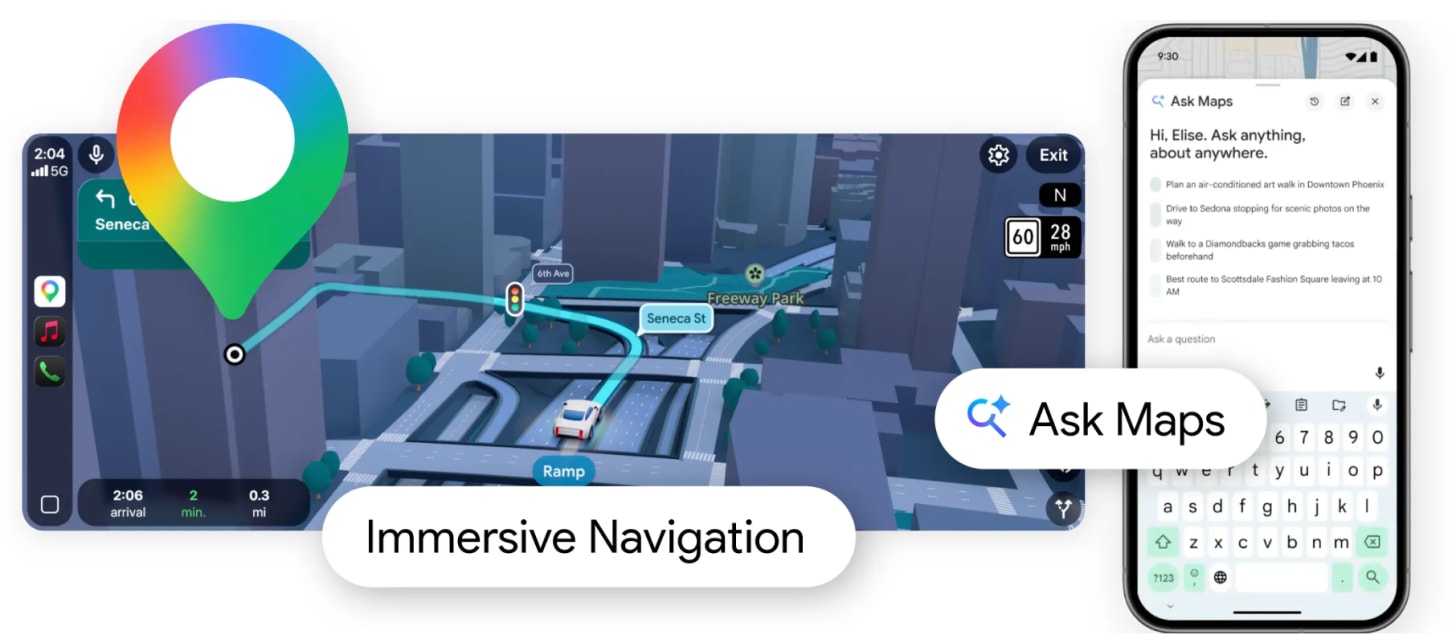
Ask Maps is a new way to get answers to your complex, real-world questions with a simple conversation. These updates to Google Maps look fairly useful. They are calling this “its biggest upgrade in over a decade.” By combining Gemini models with a deep understanding of the world, Maps now unlocks entirely new possibilities for how you navigate and explore. Learn more.
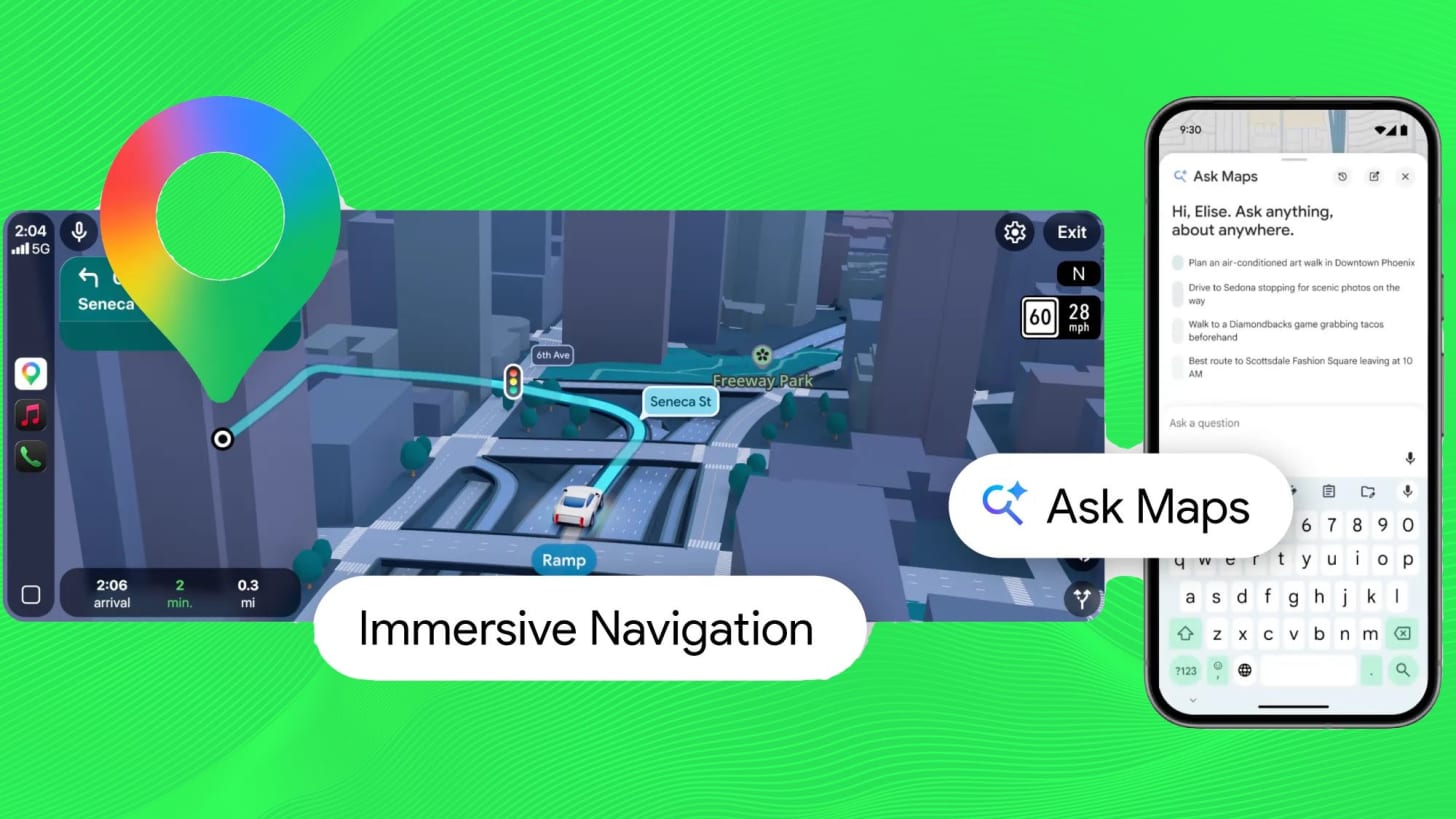
Ask Maps
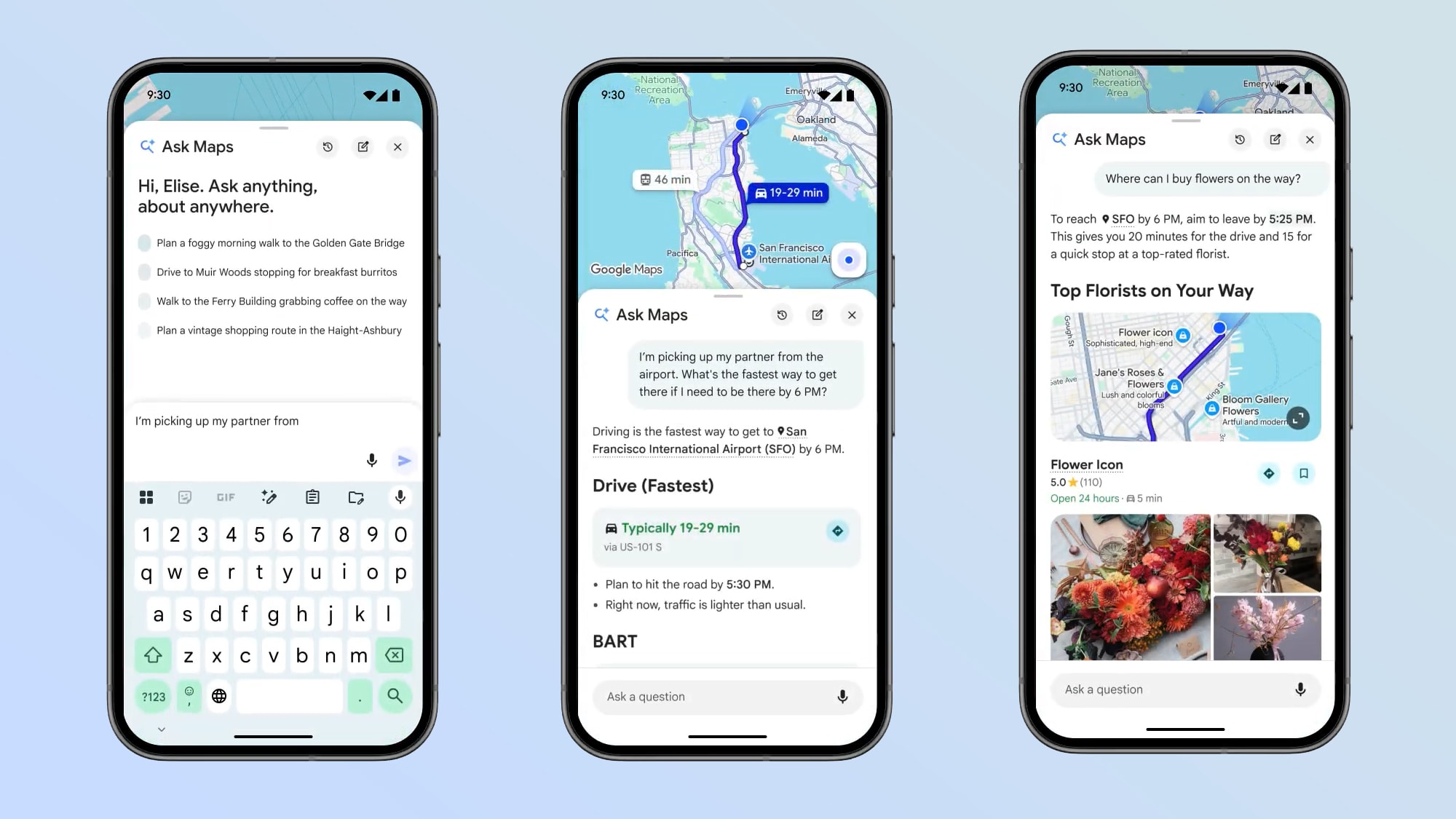
The first big change is a conversational feature called “Ask Maps”, which is designed to let you ask Google Maps more complicated questions that it never could have handled before.
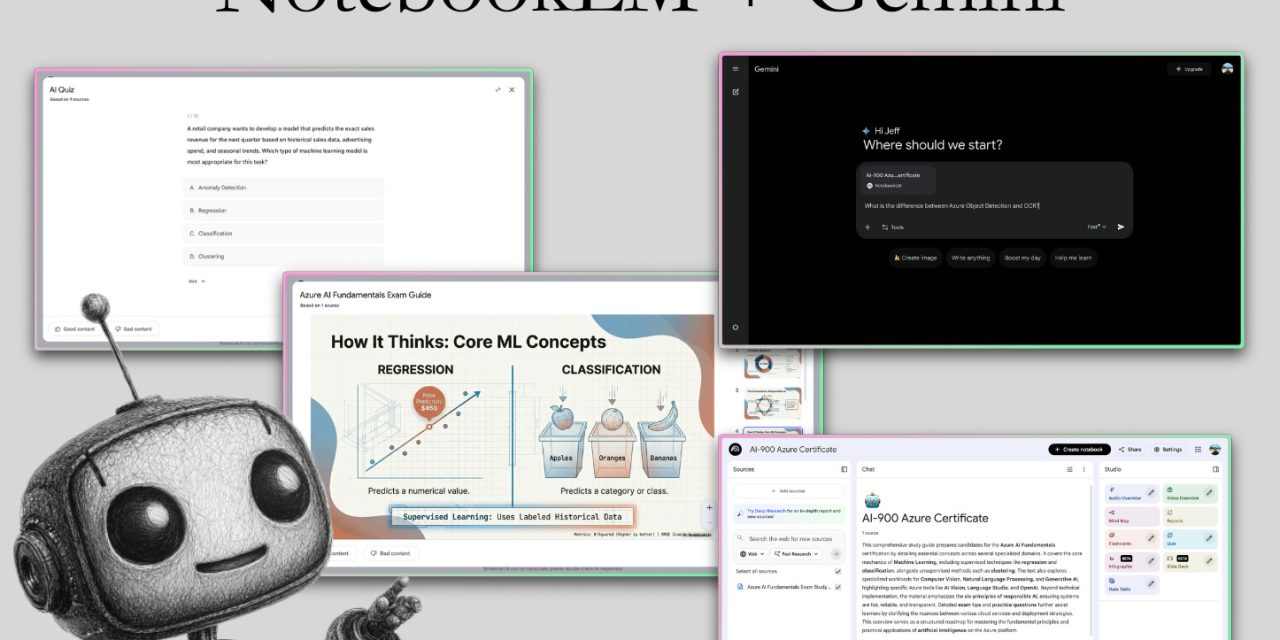
I asked for ideas for beginners on using Gemini with NotebookLM.
The AI-Augmented Engineer
The vibe-worker’s guide to software engineering, AI workflows and coding interfaces.

NotebookLM And Google AI ecosystem related Articles
-
Using NotebookLM to learn new things
-
3 Hidden NotebookLM Features Most People Don’t Use
-
The ultimate NotebookLM tutorial
-
58 Nano Banana 2 Prompts for Infographics (With Examples)
-
9 NotebookLM Prompts That Supercharge Productivity
-
We Blind-Tested ChatGPT vs Claude vs Gemini — Here’s the Winner (2026)
-
Every Google AI Tool in 2026: What Each One Does and When to Use It
-
How Google Workspace CLI Made My Claude Code Setup 10x More Powerful
-
How I Connected NotebookLM to Claude and Changed How I Do Research Forever
Gemini Embedding 2:
Google’s first multimodal embedding model. It can map text, images, video, audio, and PDFs into a single unified space, which is a massive leap for developers building advanced search and RAG (Retrieval-Augmented Generation) systems.
The model is based on Gemini and leverages its best-in-class multimodal understanding capabilities to create high-quality embeddings across:
-
Text: supports an expansive context of up to 8192 input tokens
-
Images: capable of processing up to 6 images per request, supporting PNG and JPEG formats
-
Videos: supports up to 120 seconds of video input in MP4 and MOV formats
-
Audio: natively ingests and embeds audio data without needing intermediate text transcriptions
-
Documents: directly embed PDFs up to 6 pages long
As you might know, Embeddings are the technology that power experiences in many Google products. While many people have been switching from ChatGPT to Claude, I think Gemini’s offering is worth it now in 2026 if you use Google’s ecosystem.
Let me just say I love the idea of a smarter Google Maps.
In a Nutshell what does it mean for just the average person though?
If you know someone who uses Google Maps and would want to know, feel free to share it with them.
So convenience wise what’s actually changed or changing?
New Experiences in Google Maps
I’ve tried my best to break down the key new experiences you can expect over the coming months if you are an Android and Google Maps user.
-
Ask Maps: A new conversational assistant powered by Gemini. Instead of just searching for keywords, you can ask complex, natural-language questions like, “Where can I charge my phone without a long wait for coffee?” or “Find a restaurant with vegan options and easy parking along my route.”
-
Immersive Navigation: This replaces the traditional flat 2D map with a vivid 3D view of your entire route. It uses AI to stitch together Street View and aerial imagery, showing realistic buildings, overpasses, and terrain to help you orient yourself better in unfamiliar areas.
-
Enhanced Road Details: During navigation, the map now highlights specific details like lane markings, crosswalks, traffic lights, and stop signs. This is designed to help drivers prepare for tricky turns and lane changes well in advance.
-
Transparent Buildings: As you approach complex turns, nearby buildings can become translucent on the screen. This “X-ray” style view allows you to see the road ahead even if it curves behind a large structure.
-
Contextual Route Comparisons: When Maps suggests an alternate route, it now explains the trade-offs in plain language—for example, telling you a route is “3 minutes longer but avoids heavy highway construction.”
-
Arrival Guidance: To simplify the “last mile” of a trip, the app now highlights the specific entrance of a building and provides recommendations for nearby parking as you get close to your destination.
-
Natural Voice Guidance: Voice directions have been updated to sound more human and use landmarks. Instead of “In 500 feet, turn right,” you might hear, “Go past this exit and take the next one for Illinois 43 South.”
Google Gemini is Taking Marketshare
According to Similarweb, Gemini (in pink) continues to make strides in terms of worldwide traffic and active users.
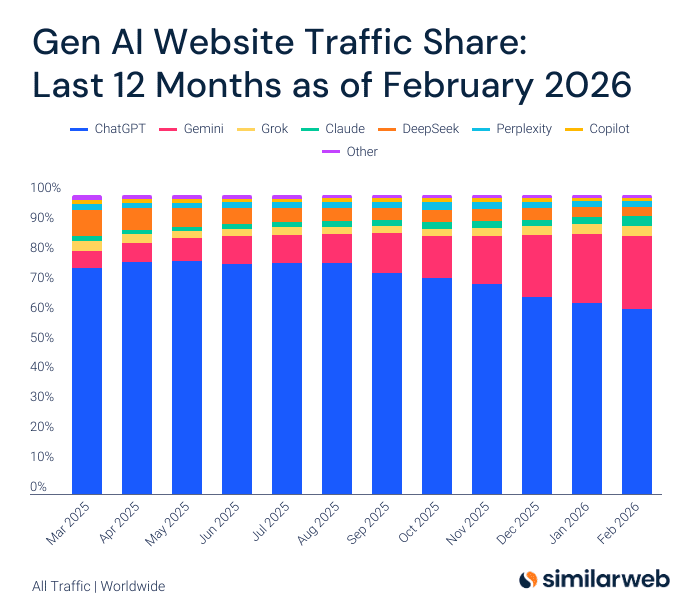
Gemini has been taking ChatGPT Marketshare in some domains
We like to talk about the Claude vs. ChatGPT rivalry lately, but Google is the one that’s made the most progress in terms of building a full-stack AI ecosystem.
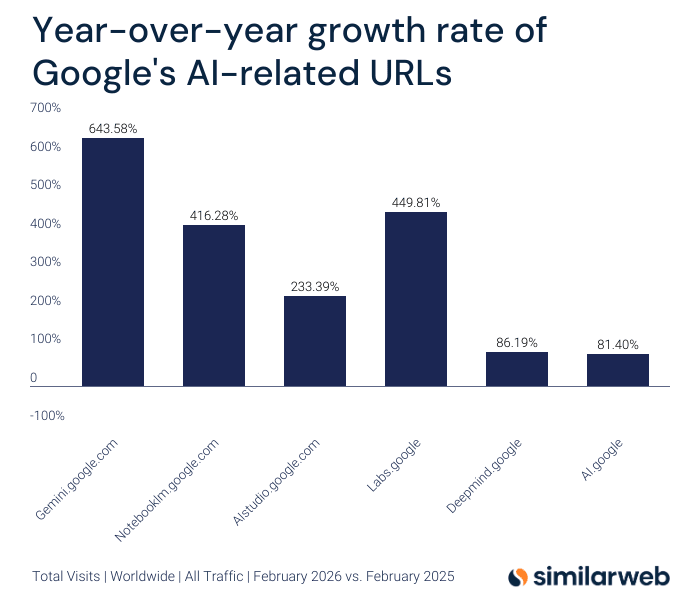
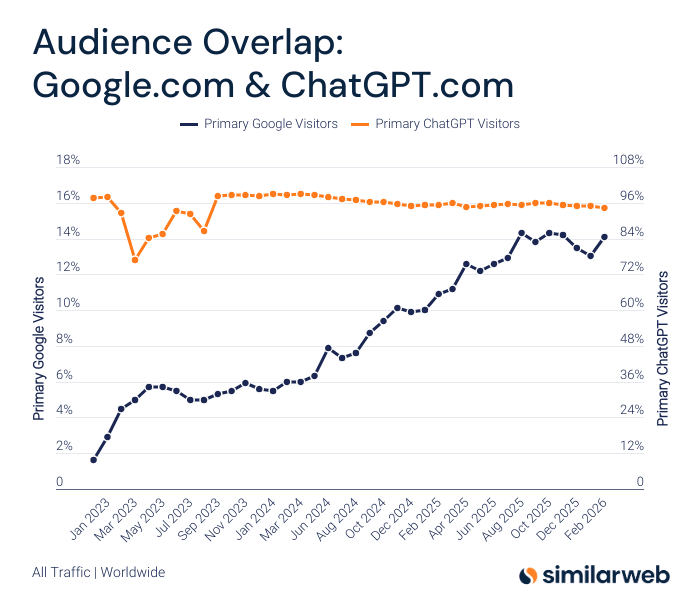
More ChatGPT Users are also using Gemini
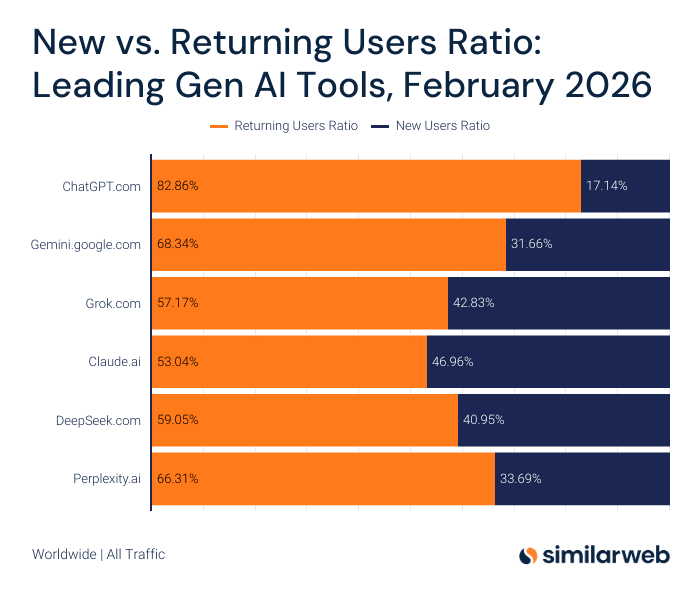
As Gemini, Claude, Grok and others reach near parity with ChatGPT, it becomes more about preference, tone and the “personality” of the chatbot (or brand of the company) for many everyday users.
-
Simliarweb has a lot of recent data they have shared on this here (in mid March, 2026).
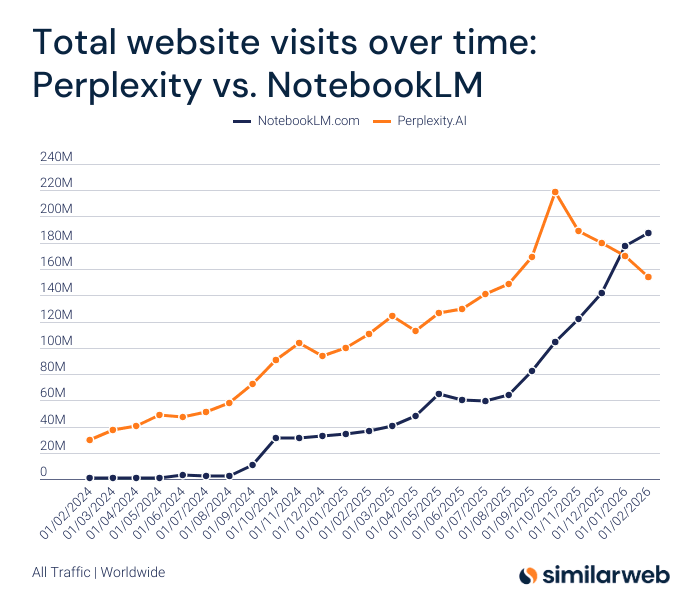
NotebookLM Overtook Perplexity is Website Visits in Early 2026
Using NotebookLM with Gemini
By of the AI Augmented Engineer. Early 2026.
NotebookLM is the world’s best tool for learning. I really mean that.
There’s nothing better at turning massive piles of information into something you can actually understand and internalize. I am in graduate school right now, and it’s naturally challenging to squeeze in my studies after work. NotebookLM has completely changed the game.
But up until now, it’s been locked mostly into the information that you give it. And the information it produces is locked mostly into the tool.
But Google recently changed that, thanks to the huge success of Gemini 3.
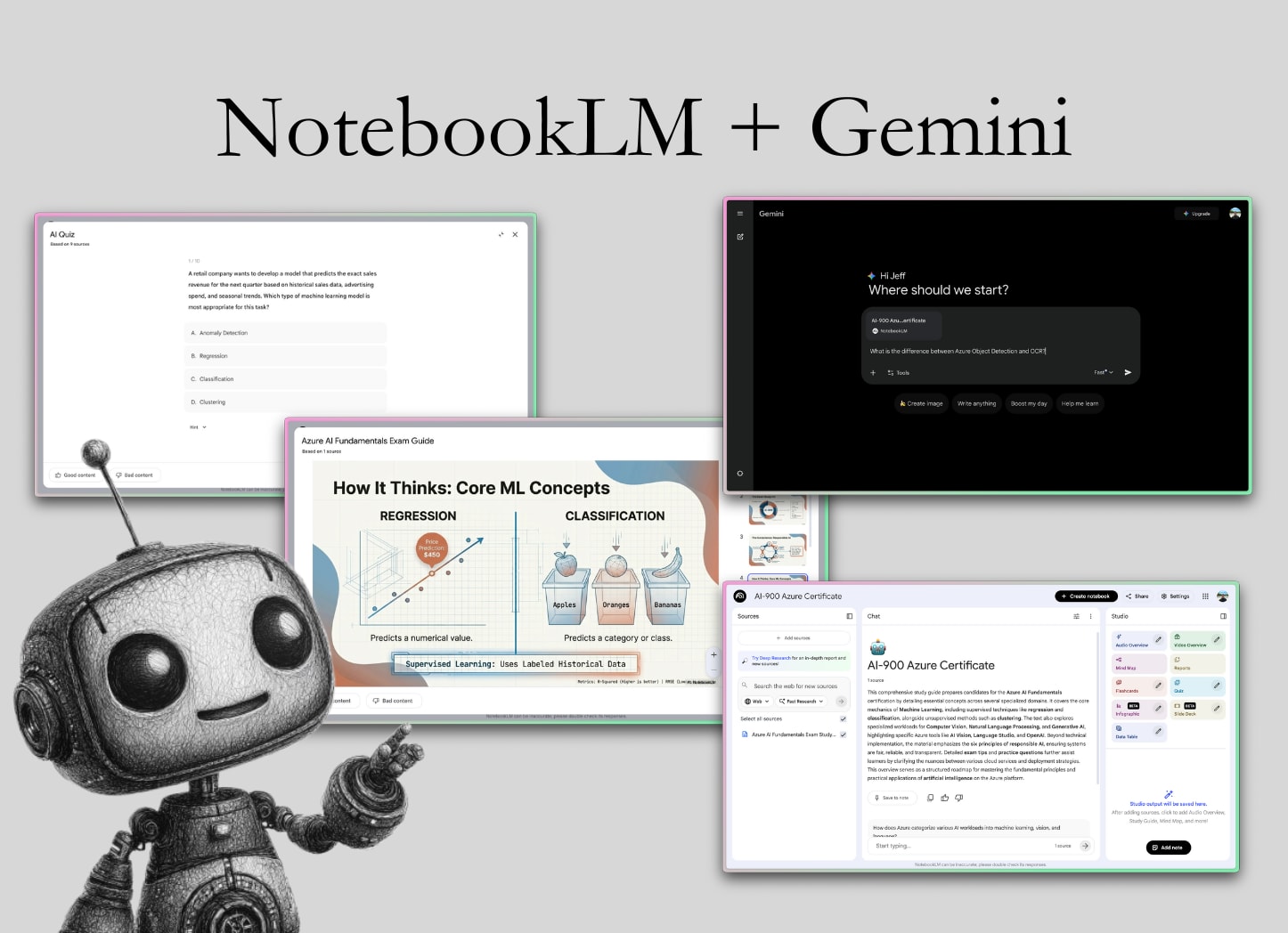
Now, you can access your private Notebooks inside the Gemini interface.
In this article, we’ll explore what NotebookLM is, some of its most useful features, and how you can use it with Gemini.
Along the way, we’ll look at real-world scenarios to illustrate why this pairing is making waves in the AI tool ecosystem, and I’ll even share some pro tips.
A brief intro to NotebookLM
NotebookLM is more than a learning tool. It’s a research intelligence system. If you’re trying to get new information into your brain for any reason, you should be reaching for it. It’s a great way to collect and synthesize information. The tool is powered by Gemini under the hood, and you can connect it to the Gemini app (we’ll talk more about that later).
Unlike a generic AI chat that knows a bit about everything, NotebookLM’s knowledge is grounded in the specific content you give it, which means it provides responses based on those trusted sources rather than random internet data or by predicting the next token.
This design greatly reduces the hallucinations (fabricated facts) that AI models sometimes produce, because NotebookLM focuses on a specific set of documents. In other words, it won’t make up answers out of thin air.
The first step in using NotebookLM is to create a new notebook.
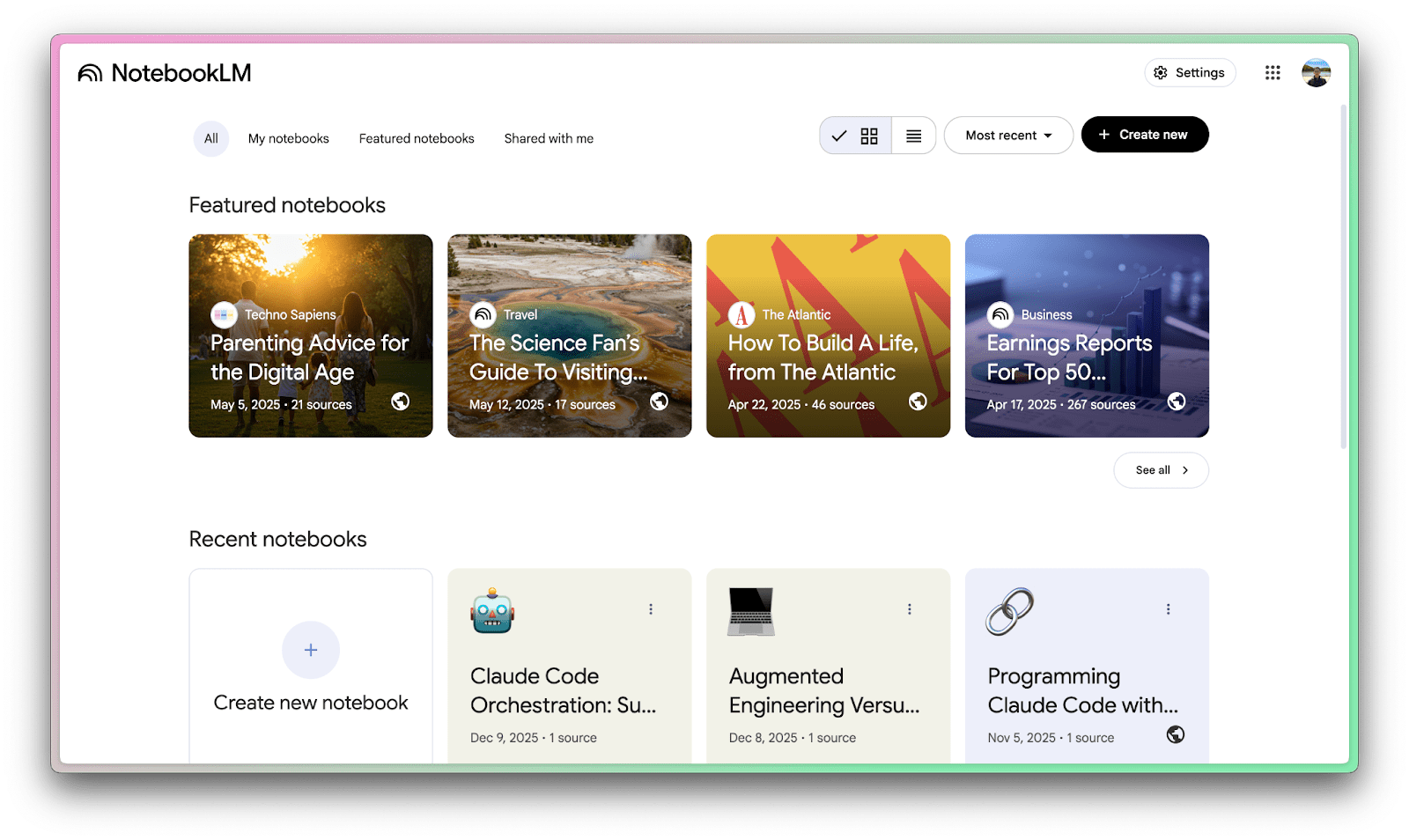
Once you’re at the website, click “Create New Notebook”.
Next, it’s time to get information into NotebookLM.
Getting information into NotebookLM
Since I’m currently studying for my Azure AI-900 certification, we’ll use my study materials as our example! There are two ways to get information into NotebookLM:
-
Uploading your own sources
-
Asking NotebookLM to research sources
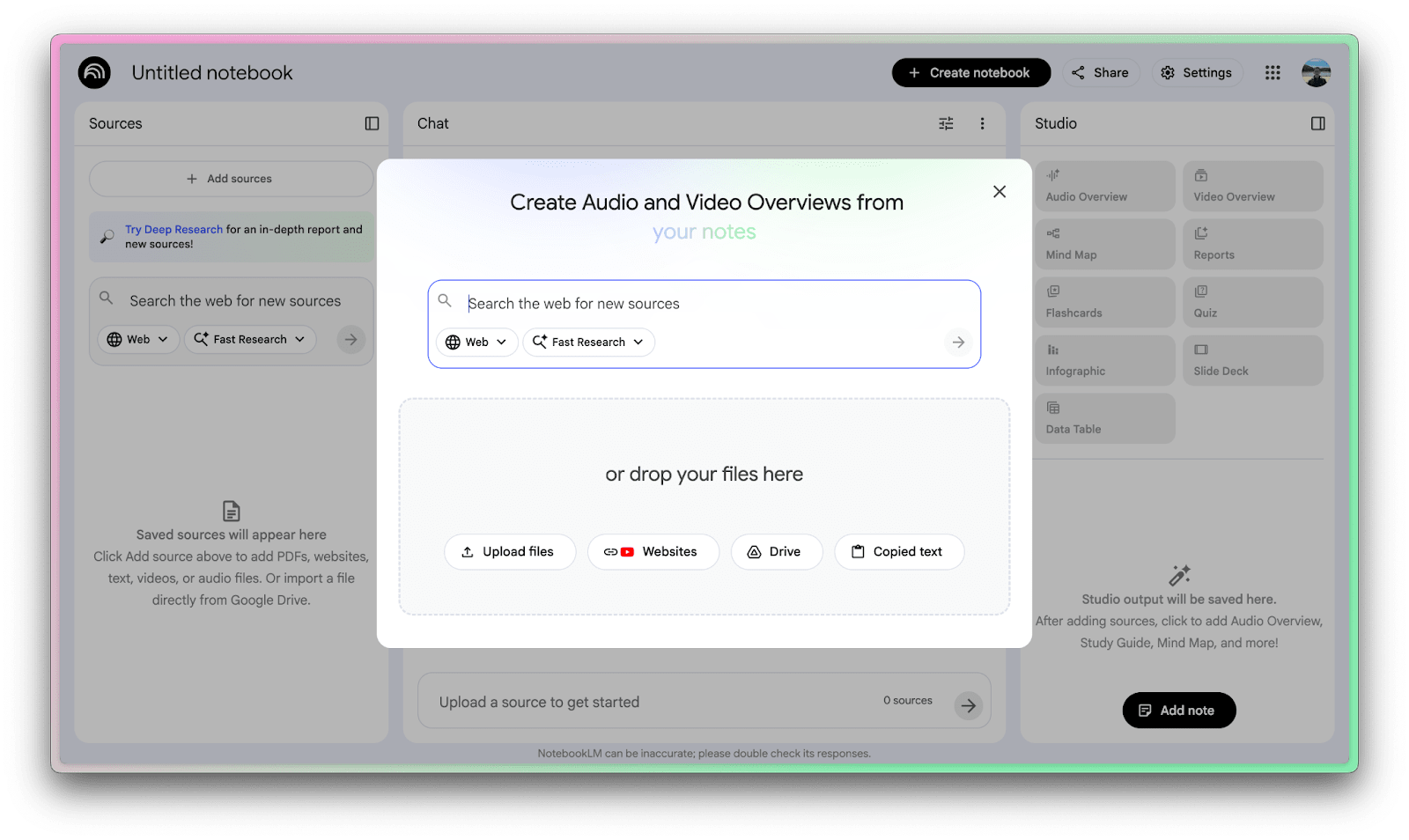
Since I already have some class notes, we’ll start there.
Uploading information is easy; you can upload files, link websites, or even use copied text. My study notes are in Obsidian, so I’ll just copy the markdown from there and paste it into the “copied text” prompt on NotebookLM.
This added a “source” to my notebook, and is enough to get started learning with features.
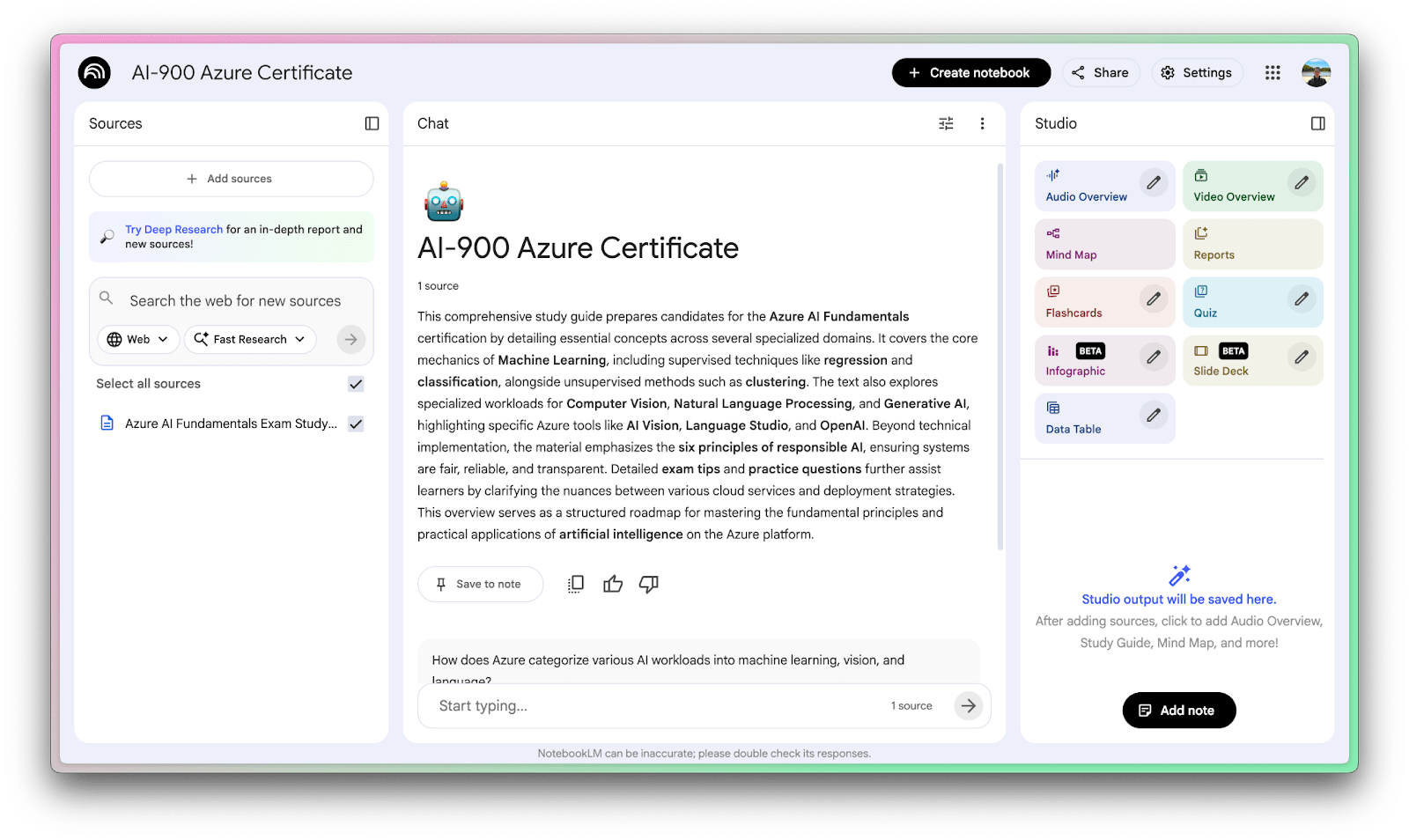
But there’s another way to add information to the notebook – research!
You can select “Fast Research,” and NotebookLM will do a web search and crawl for relevant materials, or you can do a “Deep Research” if you want the model to spend more time extracting insights from the sources it finds.
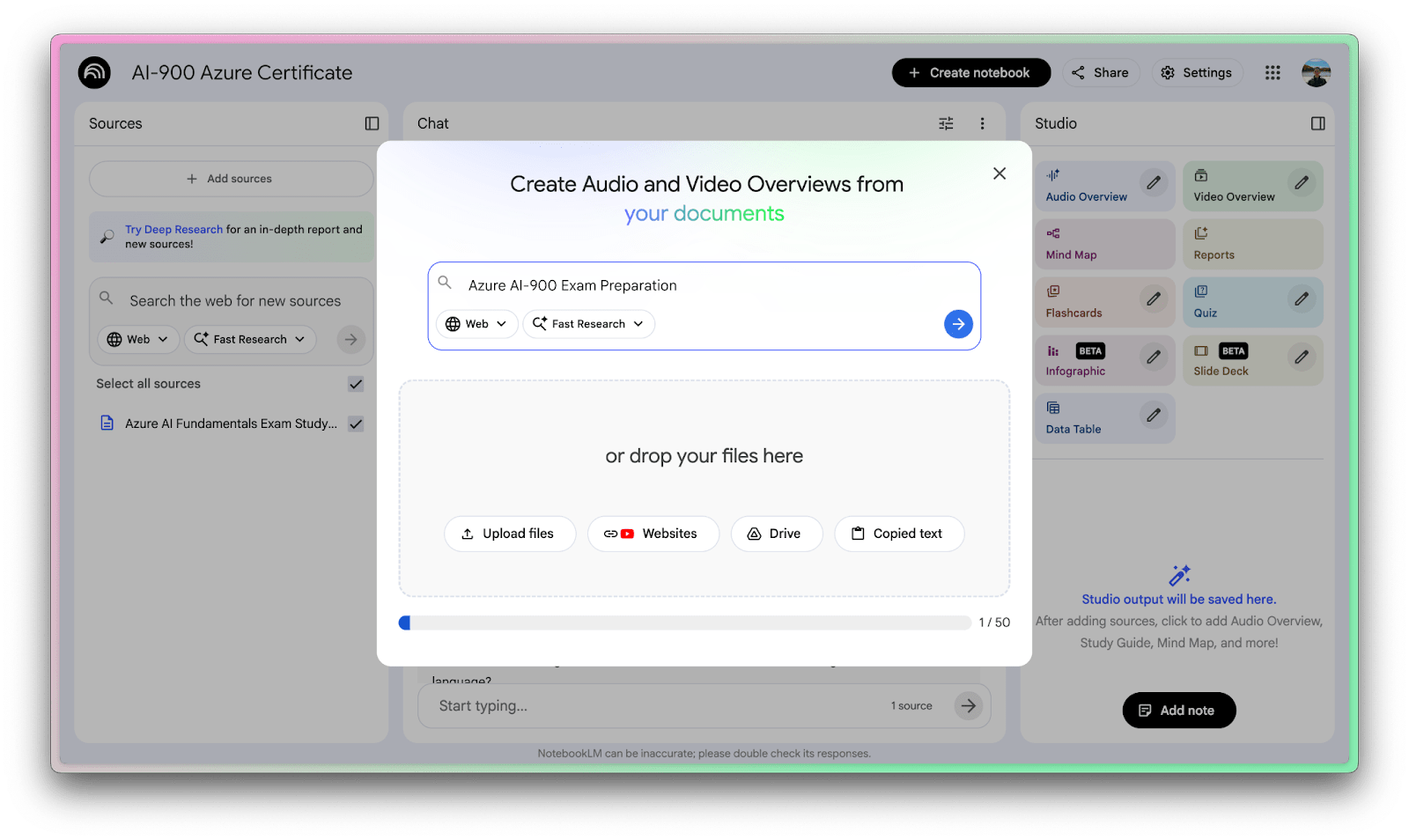
Once you’re happy with your sources, it’s time to actually use NotebookLM to learn things!
Audio overviews
The standout feature of NotebookLM is audio overviews. The model will synthesize a podcast-like audio file from the source material.
This is a great way to passively learn some of your material in a way that doesn’t feel like studying. Paired with the mobile app, it’s a great way to download information while driving, exercising, or doing household tasks.
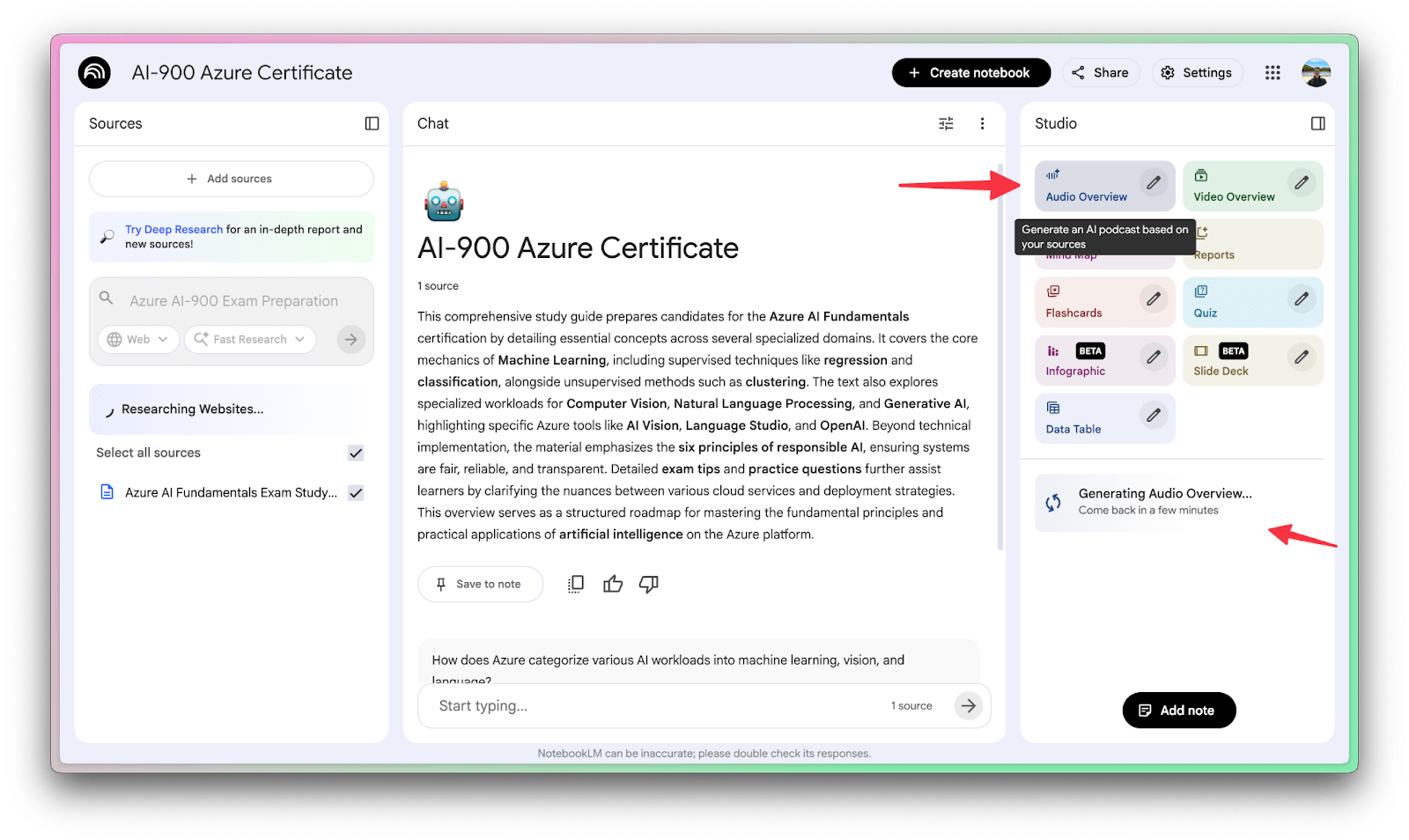
Once you click to generate an audio overview, the task will queue and take some time.
Generating a slide deck
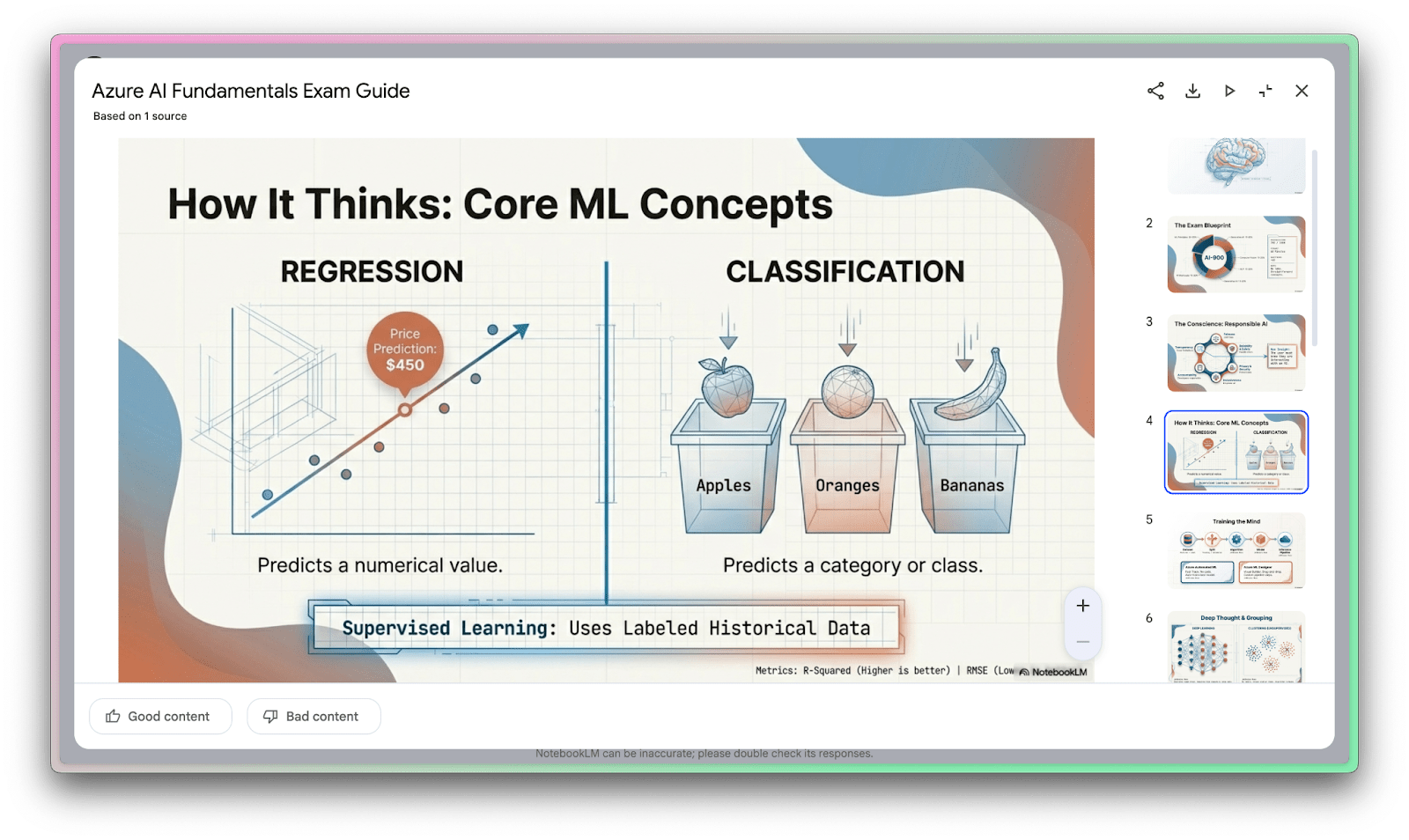
Another cool thing you can do with NotebookLM is to generate professional-looking slide decks from your notebook.
You can select the pencil to describe how you want your slide deck to look.
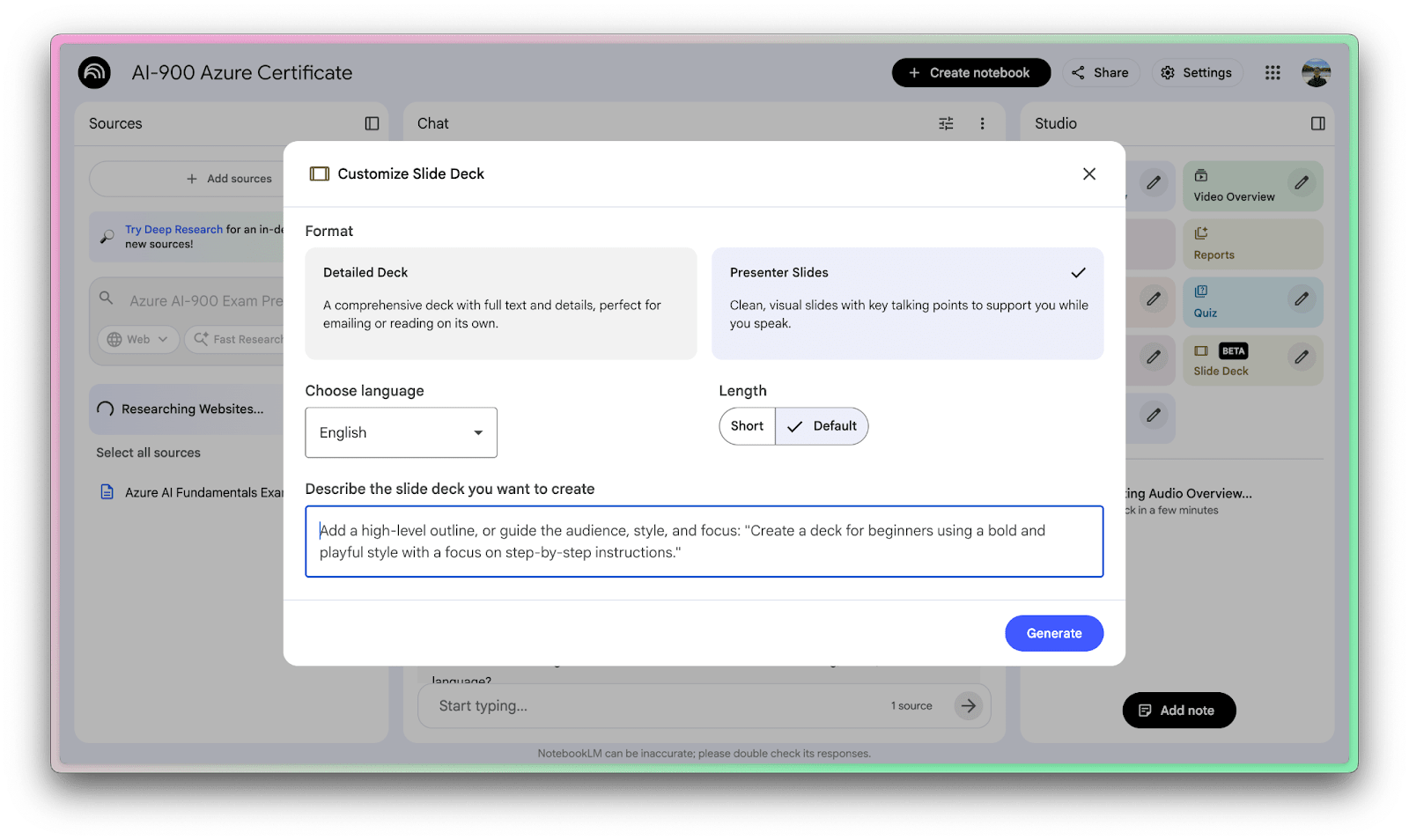
The results from this are often incredible, at the very least as a starting point for a presentation. I suspect we’ll see a lot of AI-generated decks in the future, so take advantage of being early!
Making a quiz
I’m a big fan of using the principle of active recall in studying. The idea is that the harder you work to come up with an answer to something, the more likely you are to remember it. So it follows naturally that quizzes are a great way to learn information.
I am always super pleased to use the quiz feature in NotebookLM. It’s my favorite feature, aside from the audio overviews.
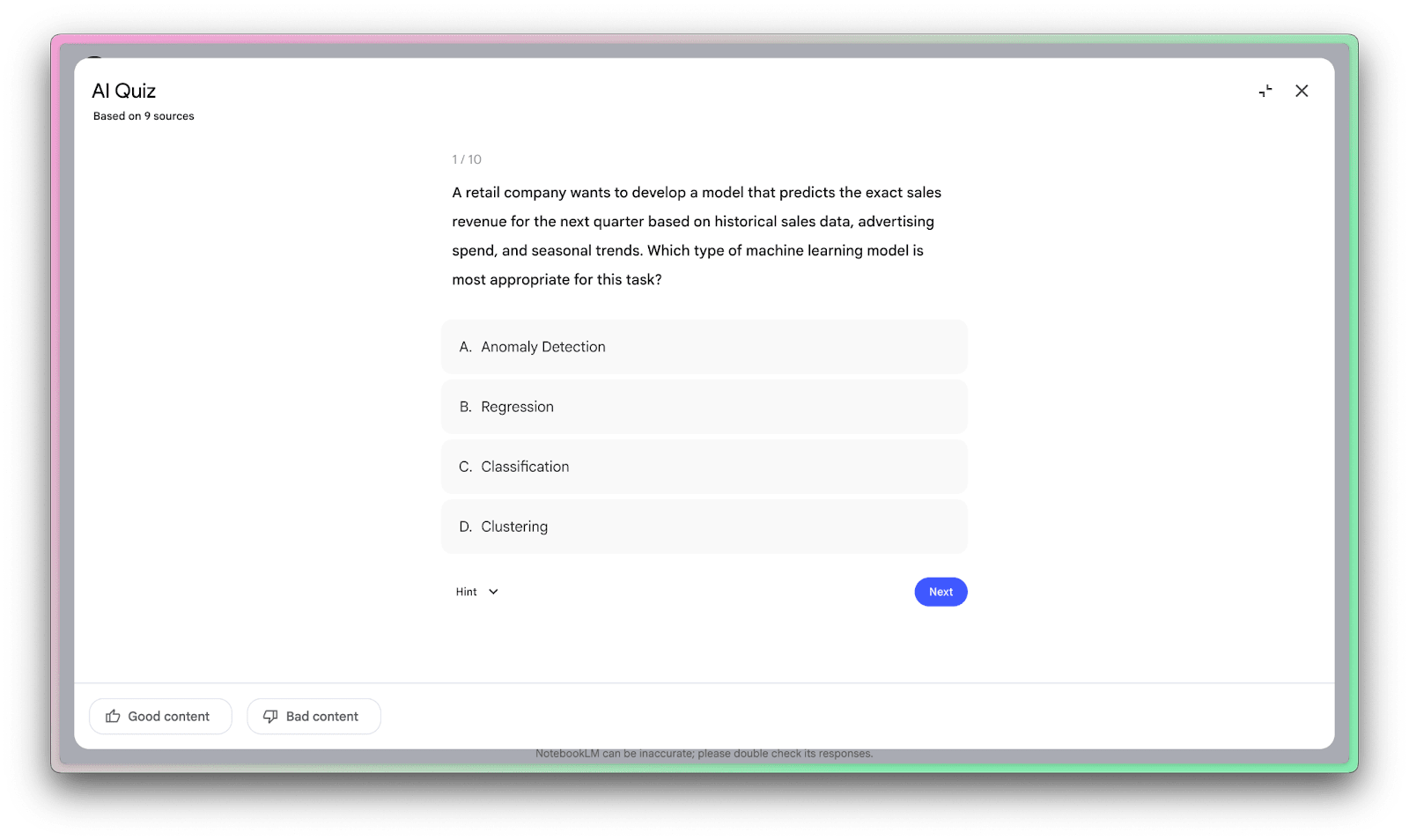
Having generated quizzes saves me an incredible amount of time!
Making a mindmap
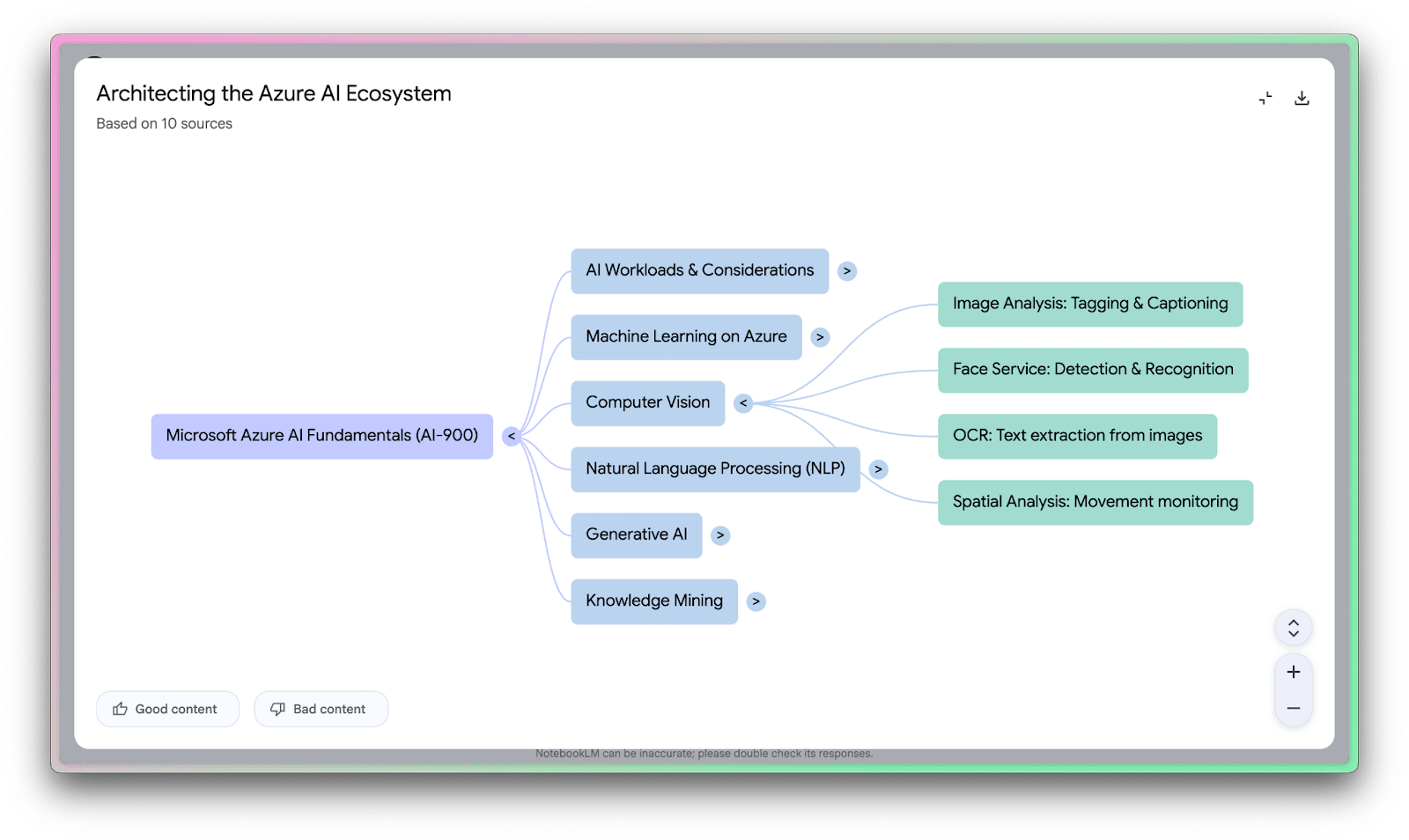
Mindmaps are a useful way to explore concepts, especially early on in the learning process. It’s a great way to get a feel for how terms relate to each other, as well as understand what may need extra attention from you. This was a very early feature of NotebookLM, and you’re likely to find it very useful.
A brief intro to Gemini
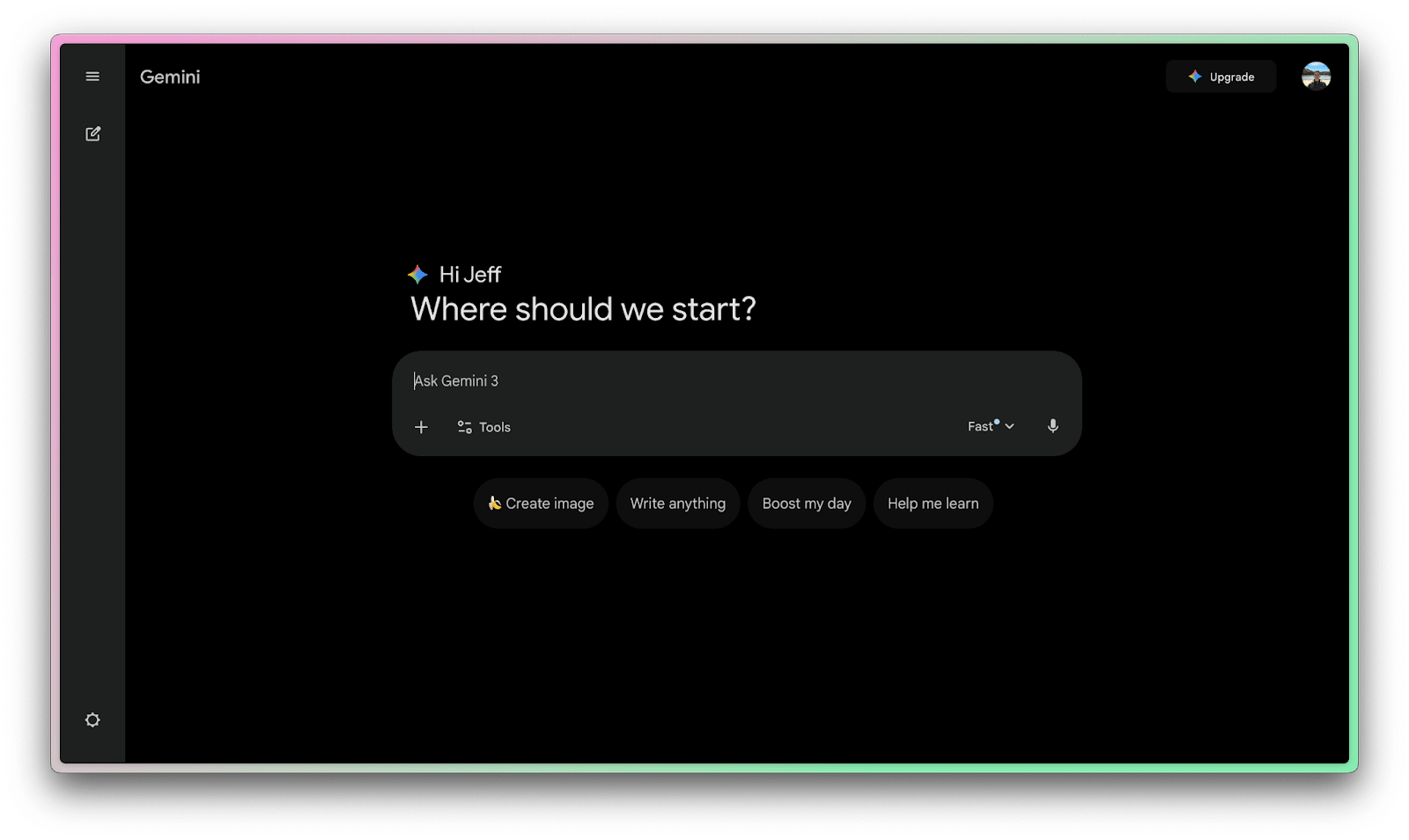
Gemini is Google’s newest family of advanced AI models. It’s the technology that powers the conversational and generative capabilities of NotebookLM, plus plenty of Google’s other AI services. If NotebookLM is the car, Gemini is the engine under the hood. And it’s one heck of an engine.
NotebookLM was built with the latest Gemini model from the ground up, which gives it a nuanced understanding of your content and enables the advanced features we discussed earlier.
NotebookLM’s answers and summaries have gotten more insightful and “intelligent” as Gemini has improved, especially with the most advanced versions becoming available to pro users.
One immediate impact of Gemini’s stronger performance is the ability for NotebookLM to handle much larger amounts of data in your sources. With Gemini, the limits on source size and quantity have ballooned.
For users, it’s the difference between just analyzing a few papers versus analyzing everything you have on a topic at once. Gemini can cope with that breadth of context, maintaining understanding across hundreds of documents.
Using NotebookLM as a source in Gemini
When you use NotebookLM on its own, it’s grounded. It will largely refuse to answer questions about things outside of the documents you provided it.
When you use Gemini, it will use its general world knowledge and search the web. And if you select a Notebook, it can reference that too.
Perhaps the most transformative aspect of pairing NotebookLM with Gemini is integration into conversational AI workflows. Google has started to let users attach a NotebookLM notebook directly into a Gemini chat session, which lets you chat with all the sources loaded into context.
This bridges the gap between a general AI assistant (like a chatbot that can answer broad questions) and your specific documents.
The AI can combine its general knowledge with your specific info. For example, we might ask it a question that could be answered by our study material from our notebook:
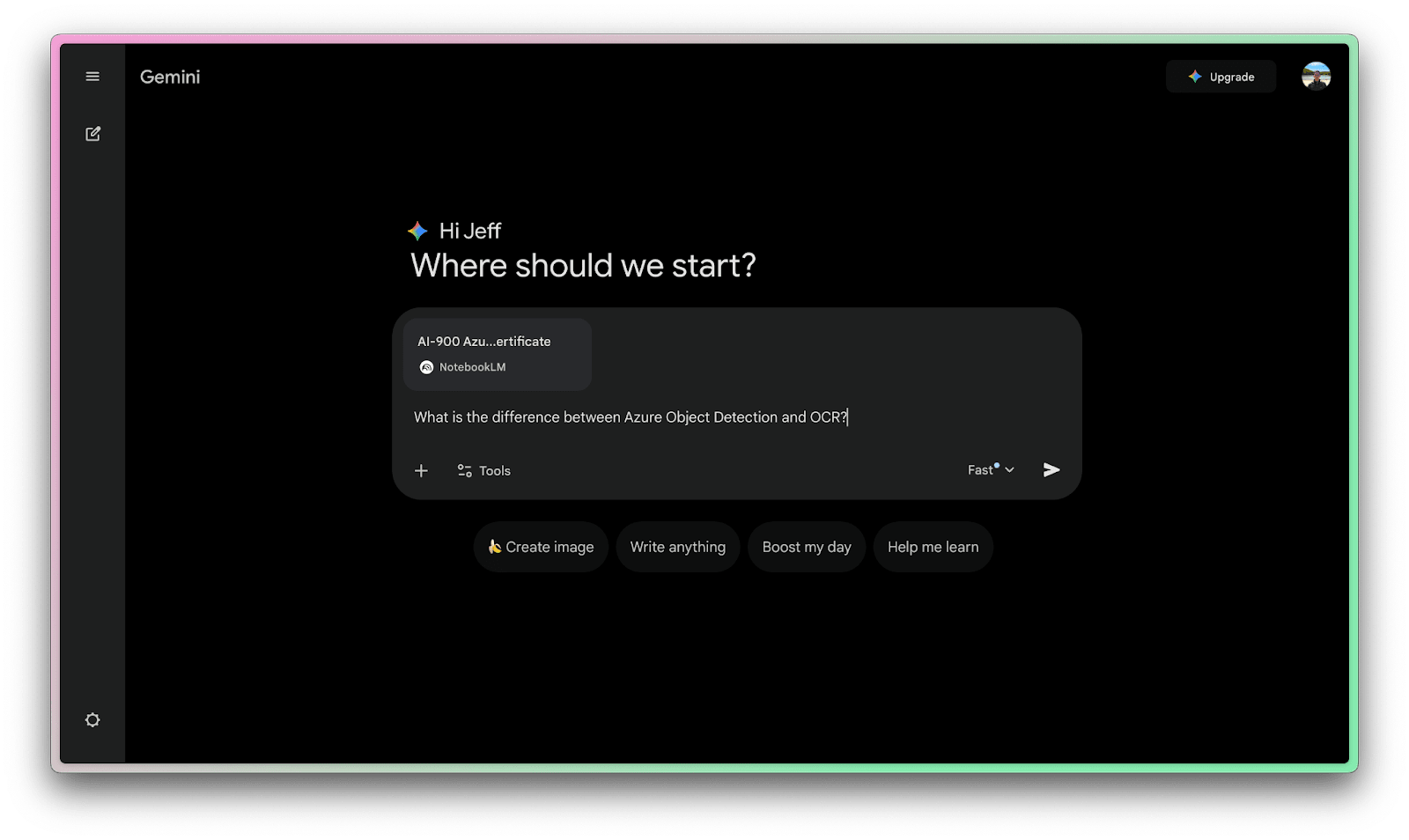
The model will take some time to search over the included notebook and return an answer using that context. Your answers are conversational, and they include links to sources in your Notebook.
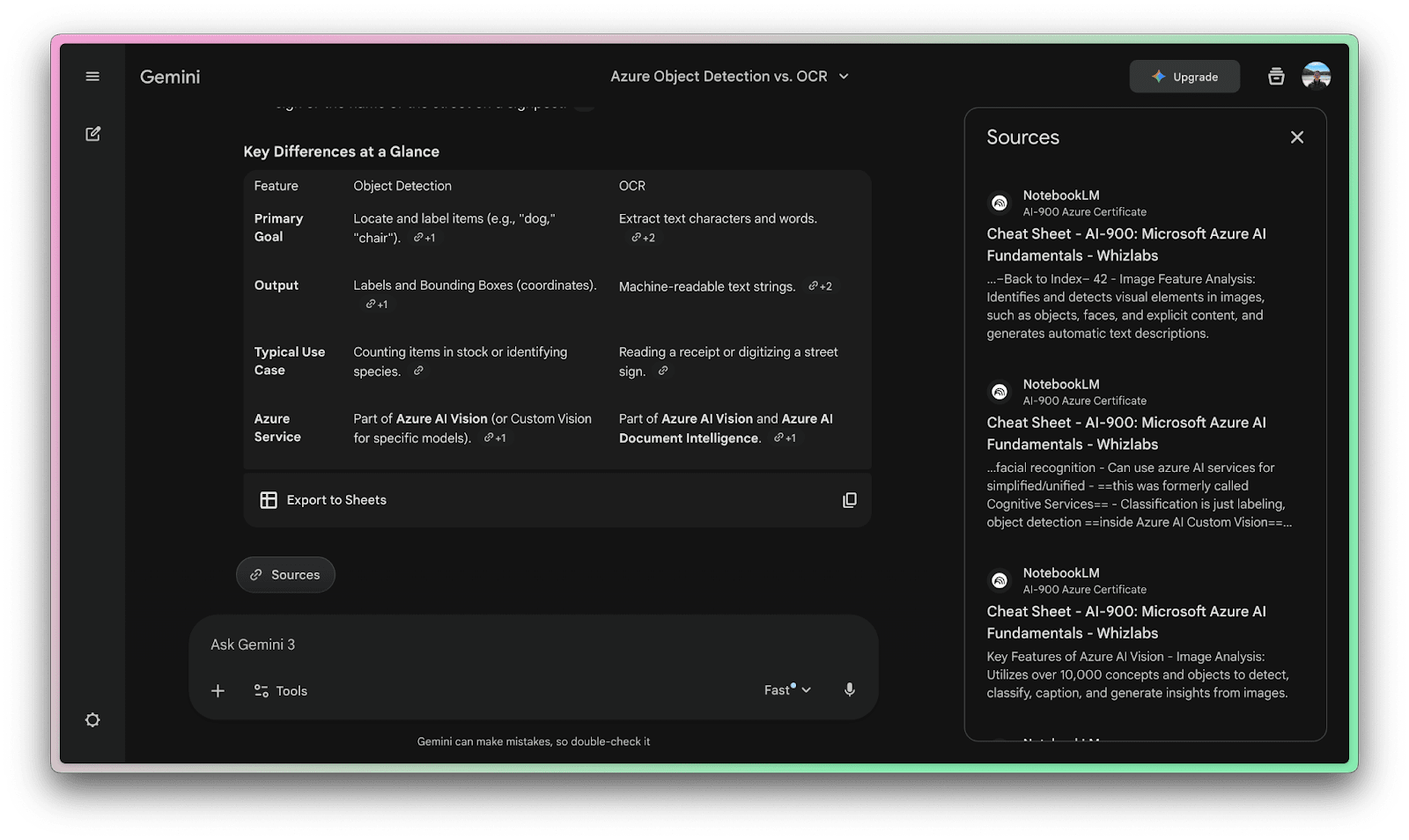
Connecting NotebookLM to Gemini is cheating at learning!
Should you still use NotebookLM?
You might be wondering if using NotebookLM makes sense if you can access the information in Gemini.
My opinion is yes. At the very least, you should use NotebookLM to create notebooks and add documents to them. Then, if you want to use Gemini to interact with the information, that’s okay.
But the NotebookLM app and website have core functionality that makes it useful independent of Gemini. AI Overviews of your information that feel like podcasts, mindmaps, flashcards, and more are all still part of the NotebookLM experience.
Use the NotebookLM when you’re trying to get information into your brain. Use Gemini and connect a notebook when you’re creating new things that use that information.
Biography of self
Jeff is a senior software engineer and AI-first builder. He writes The AI-Augmented Engineer to teach people how to use AI to write better code, ship faster, and level up their careers.
More from Jeff
How to use NotebookLM to actually learn things
Claude Code tips from the creator of Claude Code
How I vibe coded an iPhone app I now use everyday
Deep Research: A guide to speedrun learning anything
Addendum
I wanted to dig a bit deeper into Google AI updates and NotebookLM guides, in case you are super curious.
NotebookLM Cinematic Video Overviews in Brief
Watch the promo video on the official Tweet X post.
Ask Maps – Google Maps as a “location brain”
Thanks for reading! I know it was a lot, but there’s quite a few hours of NotebookLM, Gemini and Claude related material and links in this post.
Many Users are Discovering Claude and Grok for the first time in 2026
ChatGPT has nearly tapped out its TAM (total addressable market).
More NotebookLM Related Picks
There are so many great guides related to NotebookLM I wanted to highlight some I found that I think contribute something original:
-
10x your productivity with NotebookLM with
-
Building a Second Brain for Investing with NotebookLM with
-
Complete Guide to NotebookLM with
-
☕🤖 Tutorial: 10 NotebookLM Use Cases That Will 10x Your Productivity with and their team.
-
A Short, Yet Useful Guide to NotebookLM with
-
🎬 NotebookLM Turns Your Notes Into Cinematic Videos with
Google Personal Intelligence is Expanding
Personalization has been one of the holy grails of AI for decades. Google is evolving its own beta version of this. In short, Google Personal Intelligence has evolved from a limited beta into a core feature of the Google ecosystem. It marks a shift from a “reactive” chatbot to a “proactive” agent that understands your specific context—your purchases, your travels, and even your preferences—to automate tasks.
Personal Intelligence is a cross-app reasoning engine. Unlike standard AI, it doesn’t just “know things”; it “knows you.” By connecting to your Google apps (with permission) it can offer you things like hyper-personalized shopping experiences, for instance. It’s to enable a more immersive experience, a typical real-world use case or scenario might be travel:
Cross-Reference Data: It can look at a flight confirmation in your Gmail, find the hotel address in your Calendar, and then check Google Maps to tell you exactly when to leave, accounting for the food you like at the airport.
Personal Intelligence is available today in the U.S. for AI Mode in Search and it’s starting to roll out in the Gemini app and Gemini in Chrome for free-tier users. It’s up to you to weigh the privacy vs. utility of these trade-offs.
ChatGPT Briefly Surpassed Instagram in Traffic
-
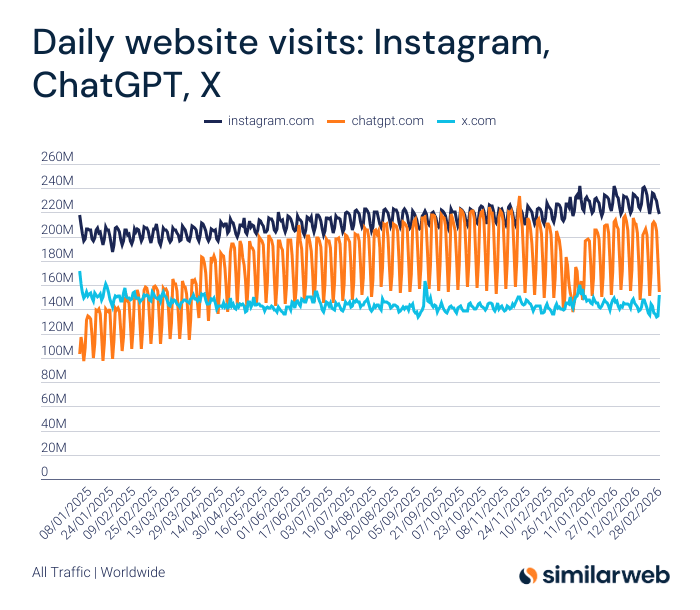
According to Similarweb ChatGPT since the beginning of 2025:
-
Surpassed X to become the fifth most-visited website in the world.
-
Briefly surpassed Instagram during its October peak.
-
Dropped back below X during November–December. 🤔
OpenAI Likely Mistimed Monetizing with Ads
It seems like ChatGPT is very late to introduce Ads. By the time they scale Ads in ChatGPT, they might have already lost ground to Gemini, Grok, Claude, DeepSeek, Qwen and others.
More NotebookLM Related Picks
-
Only NotebookLM Guide You’ll Ever Need (Updated for 2026) with
-
Claude Code + NotebookLM + Obsidian: The Research Stack Nobody’s Using
-
How to Build a Personalised Assessment System Using Google NotebookLM with
-
Beyond Audio Summaries: How to Use NotebookLM to *Actually* Design Better Learning with
-
NotebookLM: The Complete Guide 📍 with
Anyways I’m running late, I’ve run out of time.
Read More in AI Supremacy